


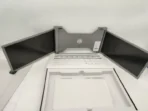

Rotating angle of screens
- Left screen(0° – 235°)

- Right screen(0° – 180°)

 The Tri-Screen still consumes small amount of power when it’s on standby status. For energy saving, waste less and low carbon living style, it’s highly recommended to remove cable connections when the Tri-Screen is not in use.
Parts Overview
Tri-Screen

- USB-C to USB-C cable

- 2 USB-A to USB-C cable


- Carry bag

- TF card (Driver contained)

- USB-C OTG cable

- Card reader

- 6* Protective caps


Protective cap
Using the protective cap if your laptop is an ultra-thin style(laptop screen thickness ≤6mm), it helps to reduce the shaking.

Set It Up
- Take Tri-screen out of the box.

- Open the two screens in the directions described in the figure 2.

- Place the bracket over the back of the screen and clamp, allowing the bracket to hug the edges and sit on top of the laptop screen.

- A stepless adjustable stand is embedded into the back of Tri-screen. Lift up the stand and pull its end to stretch the stand. It can offer extra support to the tri-screen. Press and hold the button to retract the stand.

- Using the necessary cables plug one end into the tri screen and the other into your laptop. For long term use please plug 5V/3A (or PD power) external power adapter or laptop power supply (with Type C ).
Connection Methods
- Connecting the Tri-screen by USB-C to USB-C cable
NOTE: After the driver is installed, the Tri-screen can be powered by one cable as long as the output power is > 10W.

if the output power of the laptop port is lower than 10W, external power supply is required for the Tri-screen.

When the Tri-screen is connected with external power source(5V 3A power supply) and the laptop is connected to the Tri-screen by full functioned USB-C port, the laptop can also be charged by the external power source. - Connecting the Tri-screen by 2 USB-A to USB-C cable
Step 1: Please connect both USB-A male connectors to laptop or adapter first.

Step 2: Then connect the USB-C male connectors to the tri-screen.


商品評價
目前沒有評價。